Appendix
Test system information
The test system used for this project is described in this chapter.
Software
| Property | Value |
|---|---|
| Operating system | Ubuntu 13.10 |
| Linux kernel version | 3.11 |
| Compiler | gcc 4.8.1 |
| C library | eglibc 2.17 |
1 2 3 4 5 6 | # kernel information uname -a # compiler and C library information gcc --version ldd --version |
Hardware
| Property | Value |
|---|---|
| Notebook name | HP g6-2239eg |
| Microprocessor | 2.3 GHz AMD Quad-Core A10-4600M APU with Radeon HD 7660G/7670M Dual Graphics |
| Microarchitecture | Piledriver [Youngbauer2012] |
| Chipset | AMD A70M FCH |
| Microprocessor Cache | 4 MB L2 cache |
| Memory | 8 GB DDR3 |
1 2 3 4 5 6 7 | # CPU information cat /proc/cpuinfo dmidecode -t processor # memory information free -b dmidecode -t memory |
FMA test cases
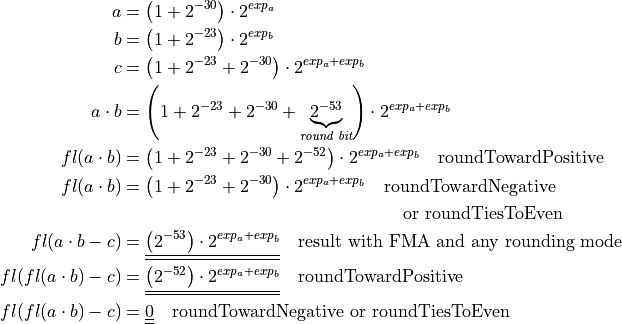
Mathematical description of the first FMA test case:
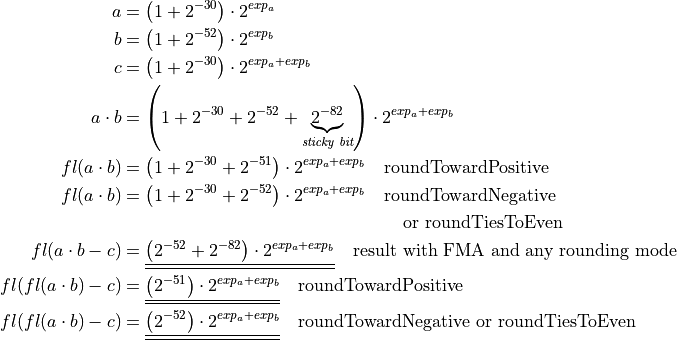
Mathematical description of the second FMA test case:
1 2 3 4 5 6 7 8 9 10 11 12 13 14 15 16 17 18 19 20 21 22 23 24 25 26 27 28 29 30 31 32 33 34 35 36 37 38 39 | /* ... */ double x = 1.0 + std::pow (2.0, -30.0); double y = 1.0 + std::pow (2.0, -23.0); double z = -(1.0 + std::pow (2.0, -23.0) + std::pow (2.0, -30.0)); #if !defined(NO_FMA) double expect = std::pow (2.0, -53.0); #elif (ROUNDING_MODE == FE_UPWARD) double expect = std::pow (2.0, -52.0); #else double expect = 0.0; #endif /* ... */ // Try to set rounding mode int error = std::fesetround (ROUNDING_MODE); /* ... */ // Initialize data for (int i = 0; i < DATA_LENGTH; i++) { v1[i] = x; v2[i] = y; v3[i] = z; } for (int i = 0; i < PARALLEL; i++) { a[i] = 0.0; } /* ... */ a[0] += std::fma (v1[j], v2[j], v3[j]); /* ... */ a[0] += (v1[j] * v2[j]) + v3[j]; /* ... */ |
1 2 3 4 | .L15: # ... vfmaddsd (%r12), %xmm5, %xmm4, %xmm2 # *v3_20, tmp107, tmp106, D.37327 vfmadd231sd 8(%rbx), %xmm6, %xmm1 # MEM[(double*)v2_18 + 8B], tmp108, D.37327 |
FMA benchmark program
1 2 3 4 5 6 7 8 9 10 11 12 13 14 15 16 17 18 19 20 21 22 23 24 25 26 27 28 29 30 31 32 33 34 35 36 37 | /* ... */ clock_t t_start = clock (); // inner loop: several computation for (long j = 0; j < i; j += PARALLEL) { /* ... */ #if defined(BENCHMARK_FMA) c[0] = std::fma (a, b, c[0]); #if PARALLEL > 1 c[1] = std::fma (a, b, c[1]); /* ... */ #if defined(BENCHMARK_ADD) c[0] += a; #if PARALLEL > 1 c[1] += a; /* ... */ #if defined(BENCHMARK_MULT) c[0] *= a; #if PARALLEL > 1 c[1] *= a; /* ... */ } /* ... */ clock_t t_end = clock (); /* ... */ |
1 2 3 4 5 | .L10: incq %rdx # j vfmadd231sd %xmm2, %xmm3, %xmm1 # b, a, c$ cmpq %rbx, %rdx # i, j jl .L10 #, |
1 2 3 4 5 | .L10: incq %rdx # j vaddsd %xmm2, %xmm1, %xmm1 # a, c$, c$ cmpq %rbx, %rdx # i, j jl .L10 #, |
1 2 3 4 5 | .L10: incq %rdx # j vmulsd %xmm2, %xmm1, %xmm1 # a, c$, c$ cmpq %rbx, %rdx # i, j jl .L10 #, |
1 2 3 4 5 6 7 8 | .L10: addq $4, %rdx #, j vfmadd231sd %xmm1, %xmm2, %xmm3 # b, a, c$0 cmpq %rbx, %rdx # i, j vfmadd231sd %xmm1, %xmm2, %xmm4 # b, a, c$1 vfmadd231sd %xmm1, %xmm2, %xmm5 # b, a, c$2 vfmadd231sd %xmm1, %xmm2, %xmm0 # b, a, c$3 jl .L10 #, |
Bucket visualizations
This appendix is intended to give a visual impression of the bucket alignment
and the accumulation process. Therefore each figure contains an orange number
line, that indicates for each column the bit significance as a power of two and
as a biased exponent representation according to the binary64 format.
The accumulation buckets are visualized as 53 bit arrays, labelled a, with two
white leading bits, a green accumulation reserve  , two white
guard bits, a red shift and finally a blue
, two white
guard bits, a red shift and finally a blue  , see Chapter
BucketSum. Each bucket is aligned to the orange number line with a
shift of 18 bits. For exceptional buckets in the over- and underflow-range the
colors have the same meaning, as for “normal” buckets, only Acc[113] in Figure
Visualization of the bucket alignment in the overflow range. is initialized with NaN and thus colorless.
, see Chapter
BucketSum. Each bucket is aligned to the orange number line with a
shift of 18 bits. For exceptional buckets in the over- and underflow-range the
colors have the same meaning, as for “normal” buckets, only Acc[113] in Figure
Visualization of the bucket alignment in the overflow range. is initialized with NaN and thus colorless.
Figures Visualization of the bucket alignment in the underflow range. and Visualization of the bucket alignment in the overflow range. show how the utmost buckets differ from the “normal” ones in the inner exponent range. These figures are intended to help with understanding the limitations of BucketSum.
Figure Visualization of the stress test case for roundToNearest. shows the worst case
summation example for the buckets Acc[56] and Acc[54] when using
roundToNearest. The worst case addend here is  , which
is exactly the tie value of this rounding mode and the only value, that results
in an error of magnitude
, which
is exactly the tie value of this rounding mode and the only value, that results
in an error of magnitude  in this case. This accumulation error
of bucket Acc[56] is visualized as red 53 bit array and shows the necessity of
the guard bits.
in this case. This accumulation error
of bucket Acc[56] is visualized as red 53 bit array and shows the necessity of
the guard bits.
Figure Visualization of the stress test case for roundTowardNegative. shows the same
scenario for roundTowardNegative and its worst case addend  . The maximal possible error for this rounding mode is almost
twice of that one from roundToNearest. The necessity of the guard bits
becomes clear as well.
. The maximal possible error for this rounding mode is almost
twice of that one from roundToNearest. The necessity of the guard bits
becomes clear as well.
Visualization of the bucket alignment in the underflow range.
Visualization of the bucket alignment in the overflow range.
Visualization of the stress test case for roundToNearest.
Visualization of the stress test case for roundTowardNegative.